
Dream11 has grown into one of India’s most popular fantasy sports platforms, with over 220 million users competing in cricket, football, basketball, and other sports. The platform lets you build a virtual team of real players and earn points based on their actual match performance. But before you can compete, you need to know how to find and join the right contest.
This guide walks you through every step of joining a contest on Dream11, from picking a match to entering your first competition.
What Are Contests On Dream11?
A Dream11 contest is a competition where users enter their fantasy teams and compete against each other. Your team earns points based on how the selected players perform in the real match. The user whose team scores the most points wins the contest or finishes in a top position on the leaderboard.
Dream11 offers several types of contests. Each one suits a different playing style, budget, and risk appetite. Here’s a quick look at the main categories:
- Mega Contests: These attract thousands (sometimes lakhs) of participants. Entry fees usually range from ₹39 to ₹59, and the top prize can reach as high as ₹5 crore. You need unique team combinations and smart captain picks to stand out in such a large crowd.
- Head-to-Head (H2H): A one-on-one contest between two users. It’s the simplest format and works well if you prefer low-risk competition. You only need to outscore one opponent to win.
- Small Leagues: These contests have limited spots and fewer participants. Your chances of finishing in the top ranks are higher here than in mega contests.
- Private Contests: You create these yourself and invite specific people to join using a unique invite code. You can set the entry fee, the number of spots, and the maximum number of teams each person can enter. This is a great way to compete only with friends or family members.
- Practice Contests: These are free to enter. They don’t offer cash prizes, but they let beginners learn the platform, experiment with team combinations, and understand how the scoring works without spending any money.
Step-by-Step Guide To Joining A Public Contest
Public contests are open for all Dream11 users. Follow these steps to join one:
Step 1: Open the Dream11 app and log in to your account. If you don’t have one yet, sign up using your mobile number or email.
Step 2: Pick your sport. Dream11 offers fantasy games for cricket, football, basketball, hockey, kabaddi, and more. Tap on the sport you want to play.
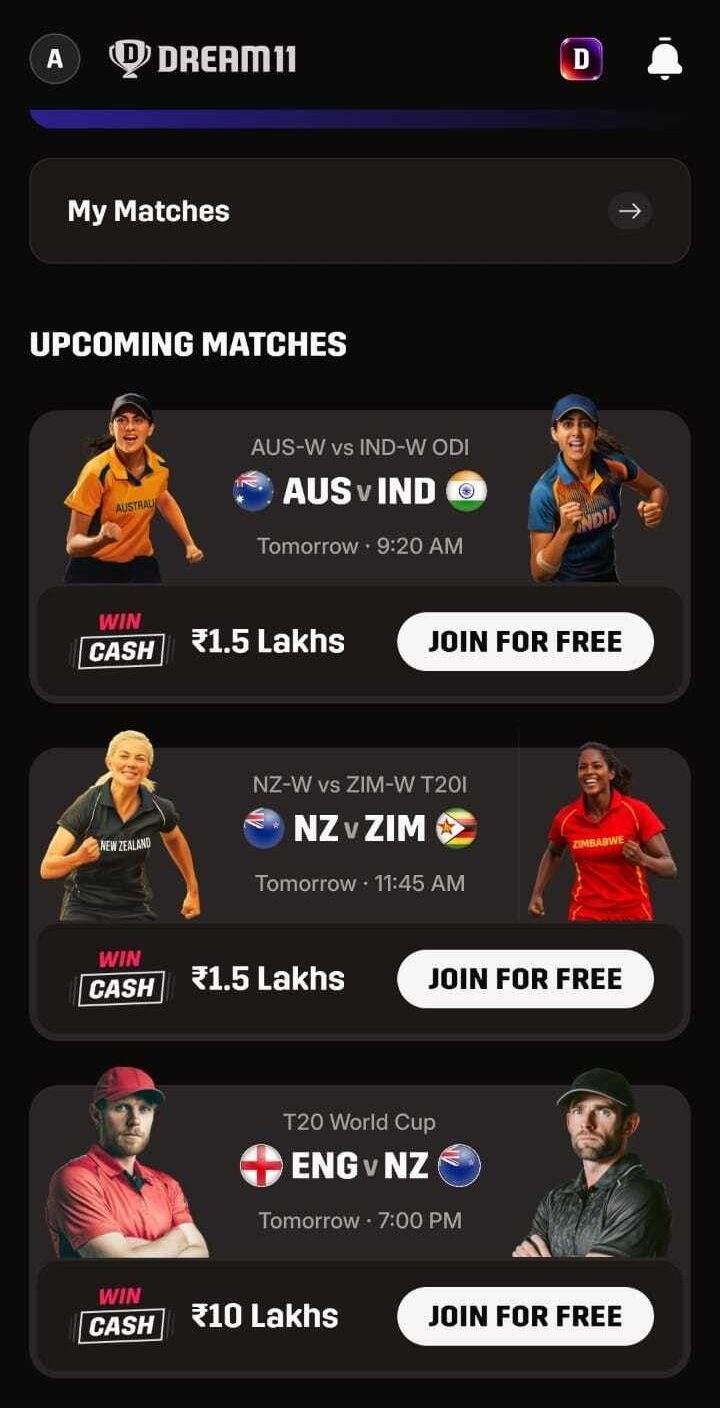
Step 3: Select a match. You’ll see a list of upcoming matches. Choose the one you want to compete in.
Step 4: Browse the available contests. After selecting the match, Dream11 shows a variety of public contests. You can filter them by entry fee, number of spots, prize pool, and other details.
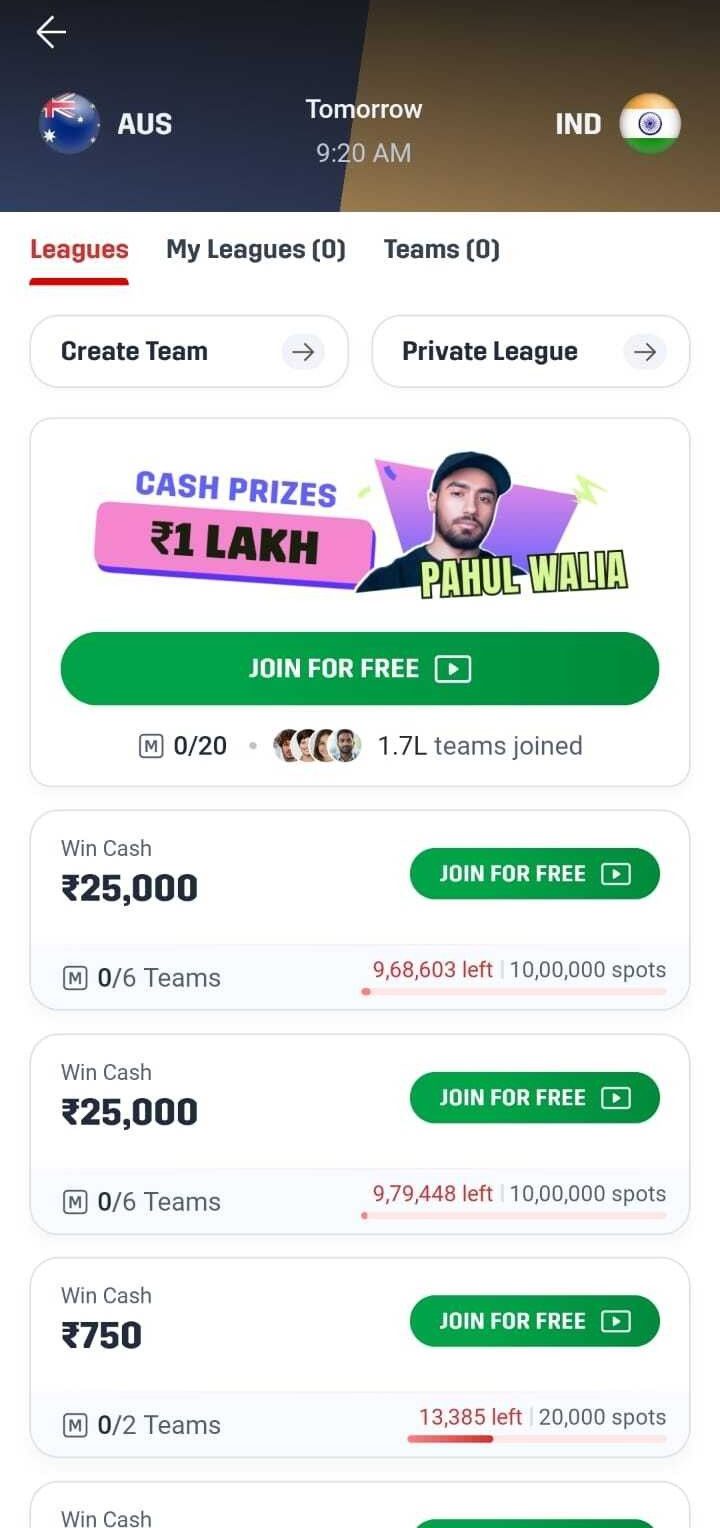
Step 5: Tap on a contest to join. Review the contest details carefully. Check the entry fee, prize breakdown, and how many teams you can enter.
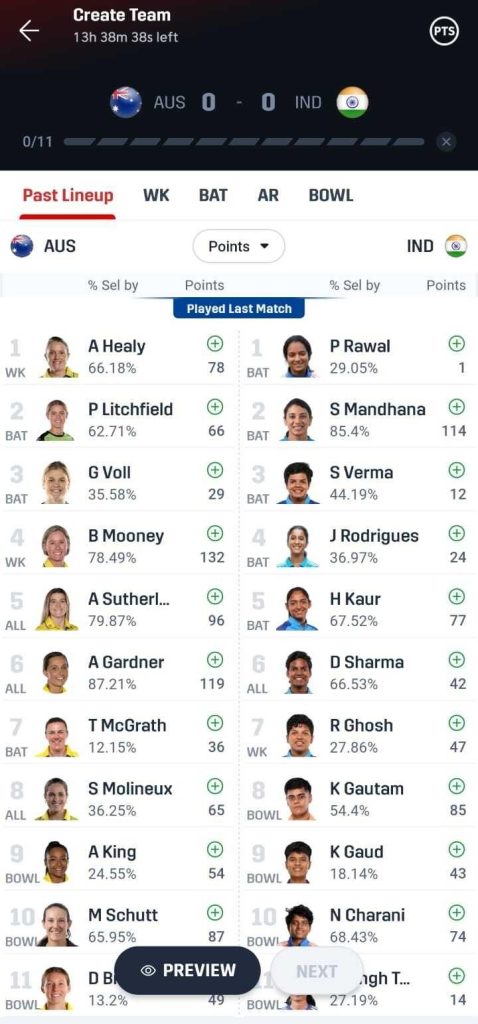
Step 6: Create your team. Build a team of 11 players from the two competing sides using the 100 credits given to you. You must include at least 1 wicketkeeper, 3 batters, 1 all-rounder, and 3 bowlers (for cricket). You can pick up to 7 players from a single team.
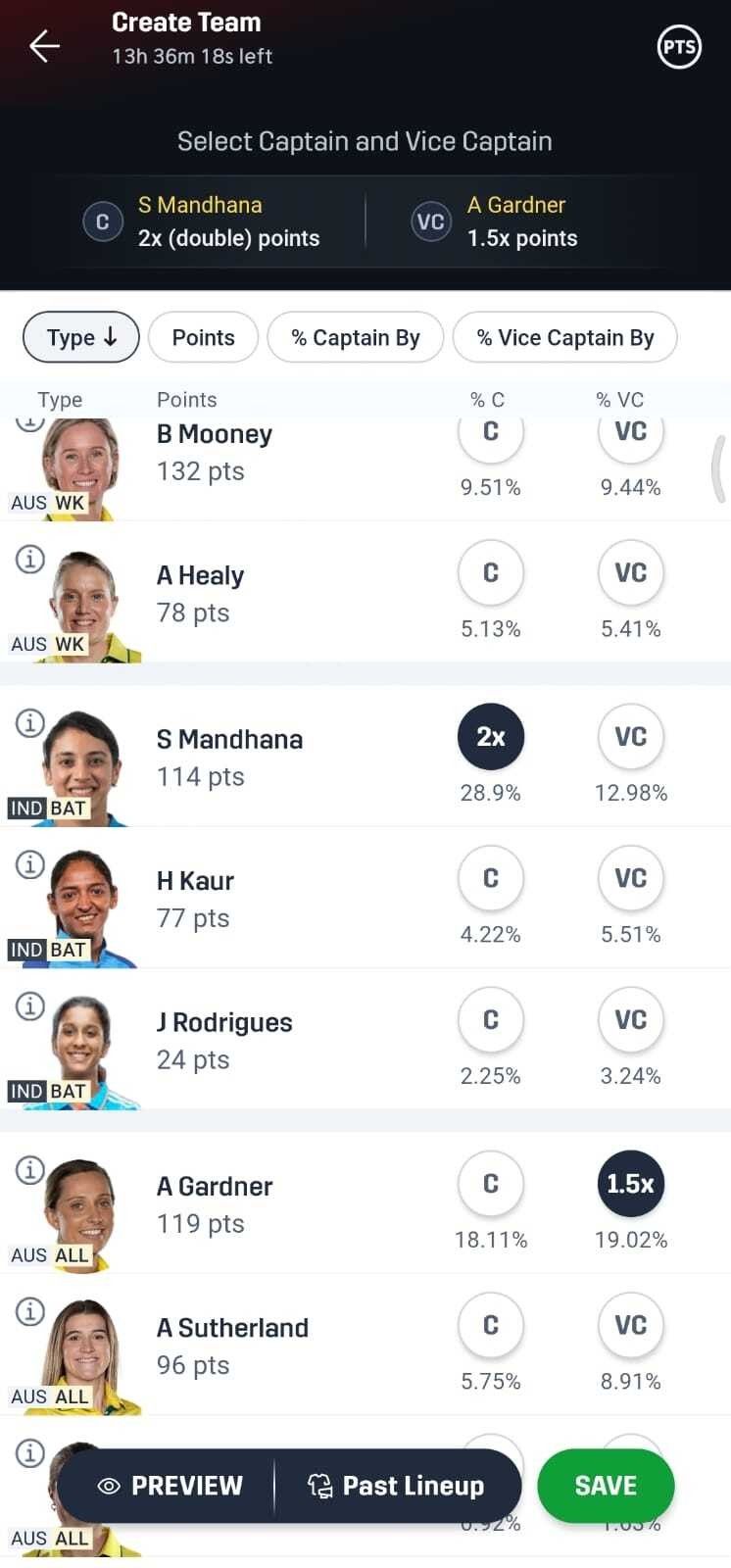
Step 7: Choose your Captain and Vice-Captain. Your Captain earns 2x points, and your Vice-Captain earns 1.5x points. These picks often decide whether you win or lose, so choose wisely.
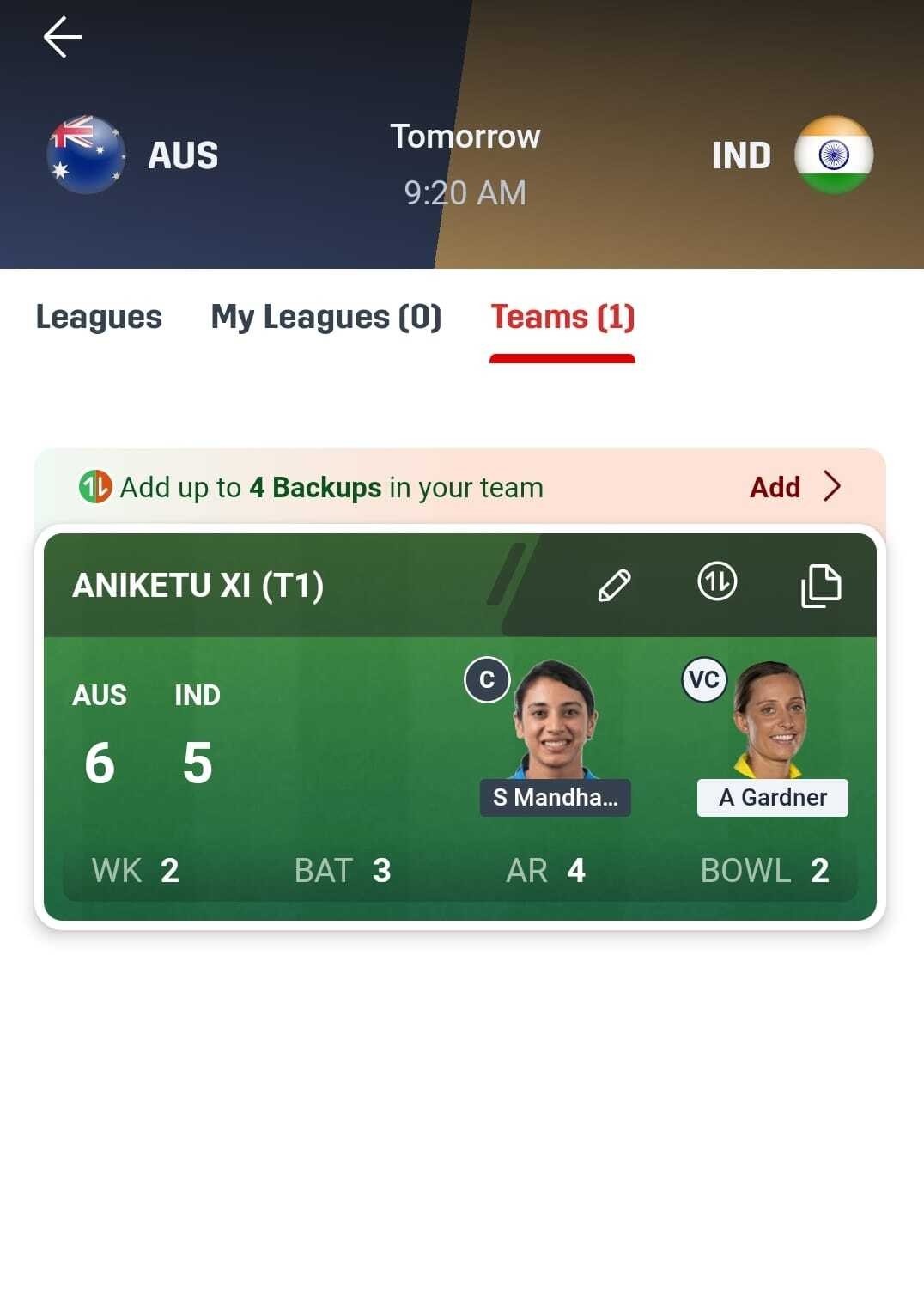
Step 8: Pay the entry fee and confirm. For paid contests, the amount gets deducted from your Dream11 wallet. For practice contests, no payment is needed. Submit your team before the match starts.
How to Join a Private Contest
Private contests work differently from public ones. Someone needs to create the contest first and share an invite code or a direct link with you. Here’s how to join one:
1. Get the invite code or contest link from the person who created the contest.
2. If you have the link: Click on it directly. It will open the Dream11 app and take you to the contest page. Tap “Join Contest,” create your team, pay the entry amount, and you’re in.
3. If you have the invite code: Open the Dream11 app, select the same match, and tap the “Cup” icon on the top-right corner. Enter the invite code, tap “Join this contest,” and complete the process.
How to Create Your Own Private Contest
Want to set up a contest on your own terms? Dream11 lets you build one from scratch. Here’s the process:
1. Open the Dream11 app and pick the match you want to play.
2. Tap the “Cup” icon or the “Contests” button at the bottom of the screen.
3. Select “Create a Contest.” Fill in the contest name, entry fee, total spots, and how many teams each person can enter.
4. Tap “Create Contest” to confirm.
5. Share the invite code or link with the people you want to compete against. They can use the code to find and join your contest.
Private contests give you full control over the competition. You decide the entry price, the group size, and even how many teams each player can use. This keeps things fair and fun, especially when you play with friends of varying skill levels.
Tips For Choosing The Right Contest
Joining a contest is easy. Picking the right one takes a little more thought. Here are a few things to keep in mind:
- Start with free or low-entry contests. If you’re new to Dream11, practice contests and small leagues help you learn the ropes without risking money.
- Match your budget to the entry fee. Never put all your funds into a single contest. Spread your entries across different contest types to balance risk and reward.
- Fewer participants mean better odds. Small leagues and head-to-head contests give you a stronger chance of finishing in the winning positions compared to mega contests with lakhs of entries.
- Check the prize breakdown before joining. Some contests pay only the top finisher, while others distribute prizes across many ranks. Choose the structure that matches your goal.
- Use multiple teams in large contests. Dream11 lets you create up to 20 different teams for a single match. Entering different lineups across contests increases your chances of covering a range of match outcomes.
What Happens After You Join A Contest
Once you join a contest and the match begins, Dream11 updates your players’ scores in real time. You can track your leaderboard position after every ball or play. When the match ends, the final points and rankings are calculated.
If you finish in a winning position, the prize money goes directly to your Dream11 wallet. You can then transfer it to your bank account or UPI after completing the PAN card and bank verification.
One important thing: you can edit your team until the match deadline. After the toss, check the confirmed playing 11 and make changes if needed. Swap out any player who isn’t in the final lineup.
Final Thoughts
Joining a contest on Dream11 takes just a few taps. The real challenge lies in building a strong team and picking the contest that fits your strategy and budget. Start with practice contests if you’re a beginner. Experiment with different contest types as you gain experience. And most importantly, research your players, study match conditions, and make informed captain choices.
Whether you want to compete against millions in a mega contest or challenge your friends in a private league, Dream11 gives you the flexibility to play your way. Now that you know the process, go ahead and join your first contest.